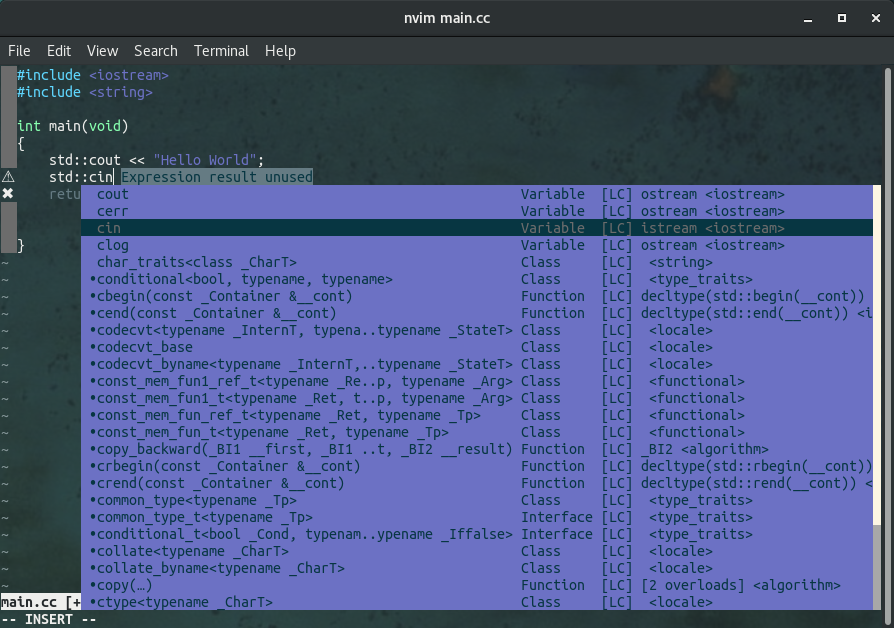
For Productivity!!!
And ZhuangBility23333
Neovim + clangd Configuration
I am using Ubuntu18.04 and version of neovim installed by apt is not latest. I choose the installation from source.
How to install
1
2
3
4
5
| git clone https://github.com/neovim/neovim.git
cd neovim
git checkout v0.4.2
make CMAKE_BUILD_TYPE=RelWithDebInfo
sudo make install
|
How to uninstall
1
2
| sudo rm /usr/local/bin/nvim
sudo rm -r /usr/local/share/nvim/
|
1
2
| curl -fLo ~/.local/share/nvim/site/autoload/plug.vim --create-dirs \
https://raw.githubusercontent.com/junegunn/vim-plug/master/plug.vim
|
Create file at ~/.config/nvim/init.vim ,filling it with following content.
1
2
3
4
5
6
7
8
9
10
11
12
13
|
call plug#begin('~/.config/nvim/plugged')
Plug 'autozimu/LanguageClient-neovim', {
\ 'branch': 'next',
\ 'do': 'bash install.sh',
\ }
Plug 'junegunn/fzf'
call plug#end()
|
Enter nvim and just type :PlugInstall + Enter to install LanguageClient-neovim, just wait.
Add following content to init.vim, between call plug#begin and call plug#end.
1
2
3
4
5
6
7
8
| if has('nvim')
Plug 'Shougo/deoplete.nvim', { 'do': ':UpdateRemotePlugins' }
else
Plug 'Shougo/deoplete.nvim'
Plug 'roxma/nvim-yarp'
Plug 'roxma/vim-hug-neovim-rpc'
endif
let g:deoplete#enable_at_startup = 1
|
After it, the file looks like this:
1
2
3
4
5
6
7
8
9
10
11
12
13
14
15
16
17
18
19
20
21
| call plug#begin('~/.config/nvim/plugged')
Plug 'autozimu/LanguageClient-neovim', {
\ 'branch': 'next',
\ 'do': 'bash install.sh',
\ }
Plug 'junegunn/fzf'
if has('nvim')
  Plug 'Shougo/deoplete.nvim', { 'do': ':UpdateRemotePlugins' }
else
  Plug 'Shougo/deoplete.nvim'
  Plug 'roxma/nvim-yarp'
  Plug 'roxma/vim-hug-neovim-rpc'
endif
let g:deoplete#enable_at_startup = 1
call plug#end()
|
how to add clang’s apt repo : https://apt.llvm.org/
As for Ununtu18.04, I do the following things :
1
2
3
4
5
6
7
8
9
10
11
12
13
14
15
16
17
18
19
20
21
22
23
|
wget -O - https://apt.llvm.org/llvm-snapshot.gpg.key|sudo apt-key add -
sudo echo "deb http://apt.llvm.org/bionic/ llvm-toolchain-bionic-9 main" >> /etc/apt/source.list
sudo echo "deb-src http://apt.llvm.org/bionic/ llvm-toolchain-bionic-9 main" >> /etc/apt/source.list
sudo apt update
sudo apt install clang-9
sudo apt install clangd-9
sudo apt install libstdc++-8-dev
sudo update-alternatives --install /usr/bin/clang clang /usr/bin/clang-9 100
sudo update-alternatives --install /usr/bin/clang++ clang++ /usr/bin/clang++-9 100
sudo update-alternatives --install /usr/bin/clangd clangd /usr/bin/clangd-9 100
|
6. Edit the init.vim
add following content after plug#end()
1
2
3
4
5
6
7
8
9
10
11
12
13
14
15
16
17
18
19
|
set signcolumn=yes
set shiftwidth=4
let g:LanguageClient_autoStart = 1
let g:LanguageClient_serverCommands = {
\ 'cpp': ['clangd'],
\ }
set completefunc=LanguageClient#complete
|
7. Enjoy
open nvim and Enjoy~~~
Note
Don’t forget to generate compile_commands.json.
Reference : GETTING STARTED WITH CLANGD